Architecture
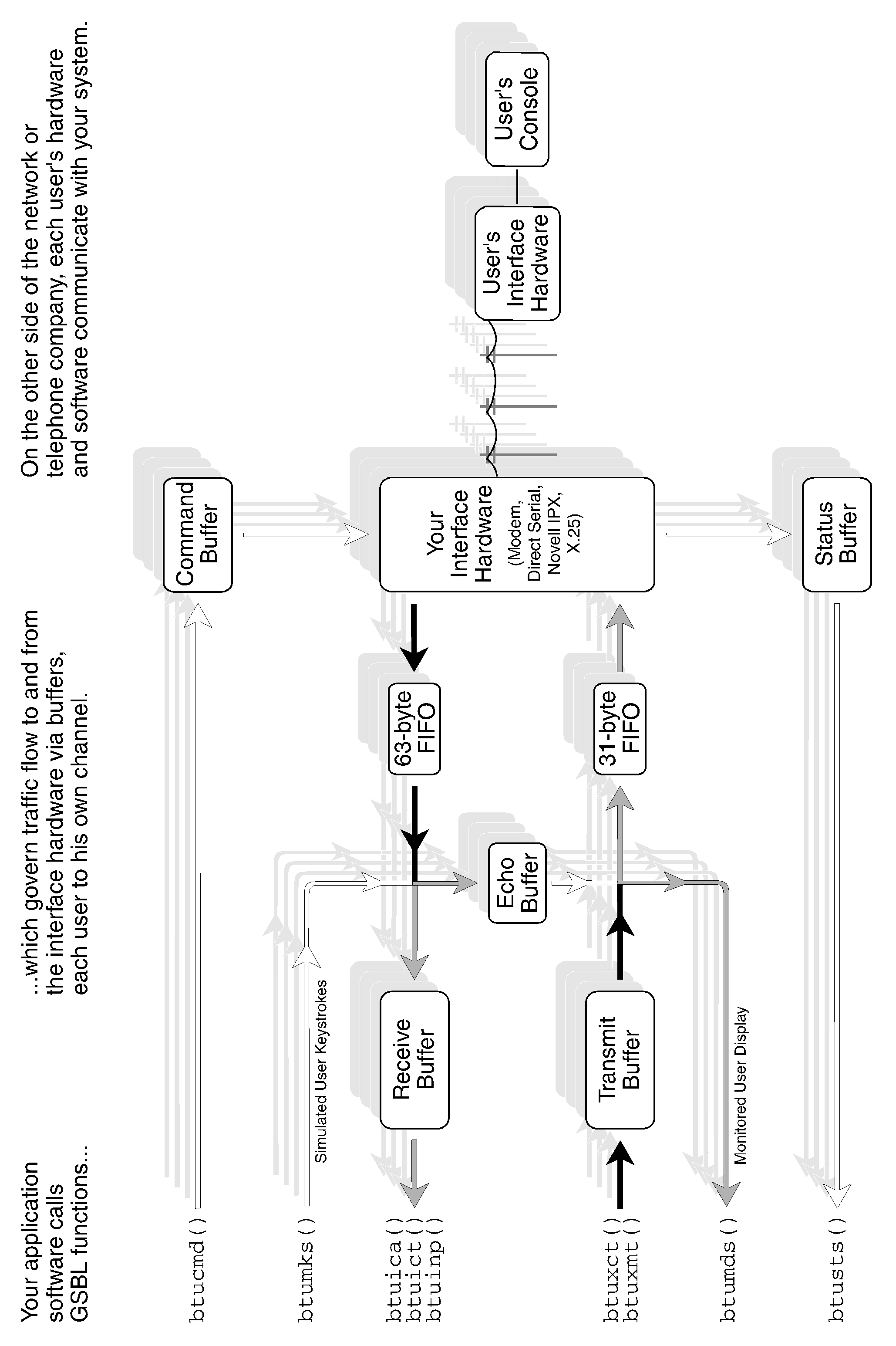
Basically, you will write software which calls GSBL functions. The GSBL will govern data traffic flow to and from the communications hardware via data buffers. Your communications hardware will then connect with users’ communications hardware. Users’ software will send requests to your software, which will provide responses.
...
Buffers Implemented for Each Channel
...
| Buffer | Access via routine | Direction of access |
| Status | btusts() | input |
| Command | btucmd() | output |
| Receiver | btuinp() / btuict() | input |
| Transmitter | btuxmt() / btuxct() | output |
| Echo | (transparent) | — |
The following buffers are only implemented for two channels — the “monitored” channels — as selected by btumon() (page 114) and btumon2() (page 115). Under normal circumstances, the first monitored channel is 00, the Local Session. The second monitored channel is any other channel the Sysop chooses to emulate.
...
Buffers Implemented for only One Channel at a Time
...
| Buffer | Access via routine | Direction of access |
| Monitored display | btumds() | input |
| Simulated keystrokes | btumks() | output |
| Monitored display #2 | btumds2() | input |
| Simulated keystrokes #2 | btumks2() | output |
...
####### Figure 2-1: How GSBL Fits Into Your Software Design
Hardware Categories
The Galacticomm Software Breakthrough Library supports multiple users on DOS-based IBM-compatible PCs using several different kinds of hardware, which fall into these categories:
...
| XECOM Category Hardware | HAYES Category Hardware | |
|---|---|---|
| Baud rates available | 300, 1200 | any rate from 75 to 57,600 |
| Phone ringing (see btusts()) | Status 1 | Status 3 input string: "RING" |
| Carrier detect (results of btucmd(chan,"A")) | Status 2 | Status 3 input string: "CONNECT" for 300 baud "CONNECT 1200" for 1200 baud "CONNECT 2400" for 2400 baud etc. Status 12 |
| Lost carrier (see btusts()) | Status 1 | Status 11 |
| Busy | Status 66 ('B') | Status 3 input string: "BUSY" or "NO CARRIER" |
| Timeout waiting for dial tone | Status 84 ('T') | Status 3 input string: "NO DIALTONE" or "NO CARRIER" |
| Timeout waiting for carrier | Status 84 ('T') | Status 3 input string: "NO ANSWER" or "NO CARRIER" |
| Command complete successfully (see btucmd()) | Status 2 | Status 12 Status 3 input string: "OK" (in most cases) |
| Successful Reset of modem (bturst() return code meaning OK) | 0 | 1 |
| Short pause btucmd("..p..") and Long pause btucmd("..P..") within a string of commands | Takes place AFTER the commands preceding it | Takes place BEFORE all other commands in the string |
| Commands not supported on Hayes hardware (see btucmd()) | ^M Frequency monitor ^O set 110 baud speed ^X Analog loopback, originate mode ^Y Analog loopback, answer mode H Hold I Identify version i Identify revision L Line analyze l ("ell") 1200 baud error statistics | (these commands will generate a status code 13 with Hayes hardware) |
| Commands supported only on Hayes hardware (see btucmd()) | (this command will generate a status code 63 "?" on XECOM category hardware) | ^F set speed to 2400 baud |
Hayes-Protocol Modems
In this category of hardware, the computer is connected in series with three devices: an RS-232-C serial interface device (called a UART); a Hayes-compatible modem; and a telephone line. The two functions of controlling the modem, and communicating through it, are handled using the same signals. This is accomplished using two modes of operation: the modem is either in command mode or in online mode.
...
All other hardware in the HAYES category must include the 8250-type UART required by the UART category of hardware. The 16450 and 16550 UARTs satisfy this requirement. More on that in the upcoming discussion of RS-232 serial ports.
Xecom-Protocol Modems
The Galacticomm Breakthrough card Model 16 and Model 4 contained, respectively, 16 and 4 complete modems on a single ISA card. The computer talks to each of these modems over an 8-bit parallel bus. The functions of command and communications are not implemented over the same signals, but take four distinct paths: command, status, transmit and receive. This method was developed by Xecom Inc., Milpitas, California, for their compact MOSART 300/1200 baud modems.
...
Starting an outgoing callAnswering an incoming callSensing loss of carrier (user has hung up)Certain test and measurement functionsFigure 2-2 (page 5) summarizes the differences between the Hayes and Xecom protocols. The teleconferencing example program on page 182 works on Xecom-compatible hardware.
UART Category Hardware: RS-232 Serial Ports
You could also use the Galacticomm Software Breakthrough Library to talk directly with any RS-232 compatible device, such as a terminal, printer, plotter, another computer, or many other types of devices.
...
You will need an interface card in your PC, equivalent to the IBM Asynchronous Communications Adapter. Most serial cards for the IBM PC family meet this requirement. They are designed to support what the operating system identifies as COM1 or COM2 (although the Software Breakthrough does not use DOS or BIOS to interface with these ports). One thing that the card must have is an integrated circuit called a UART of the 8250 family, which includes model numbers like 16450 and 16550. The 16550 model UART is highly desirable for its character buffering capability. The GalactiBoard 8-port serial card can supply you with a channel group of eight 16550 UARTs.
Novell Netware LAN Access
You can use the GSBL to interface to other programs across a Novell Local Area Network.
...
See page 188 for more on LAN programming with the GSBL.
X.25 Packet Switching Network Access
X.25 is a way for computers to talk to other computers over a packet switching network. A packet switching network is very much like a local or long-distance telephone network, but with a different emphasis. A telephone network is called a “circuit switching” network. During a phone call, one handset is theoretically in continuous electrical contact with another handset that could be anywhere else in the world.
...
“Technical Aspects of Data Communication”, by John E. McNamara, published 1988 by Digital Equipment Corporation, chapter 24: Packet Switching“X.25 Explained”, by R.J. Deasington, published 1988 by Ellis Horwood BooksSee page 202 for more on programming with the GSBL/X25 communications interface.
...
For example, the btux29() function (page 159) is useful only with the X.25 Software Option. Even if you do not own that option, there is a btux29() function that does nothing. This allows you to write C code that is compatible with all variations of the GSBL, and not get any undefined symbols when you go to link. See the variables btulan (page 19) and btux25 (page 23) for ways your software can determine what variation of the GSBL it is linked with.
ASCII versus Binary Input Modes
There are two methods for receiving data using the Galacticomm Software Breakthrough Library.
...
In ASCII input mode, the following characters are treated specially when received:
ASCII Mode Special Input Characters
| Hex | Dec | ASCII | Function | Assignment |
| 00H | 0 | nul | (ignored) | |
| 08H | 8 | bs | backspace | btubse(), page 34 |
| 0DH | 13 | cr | carriage return | btutrm(), page 150 |
| 0FH | 15 | si | output-abort | btutru(), page 152 |
| 11H | 19 | xon | output-resume | btuxnf(), page 169 |
| 13H | 21 | xoff | output-pause | btuxnf(), page 169 |
| 7FH | 127 | del | backspace | btuxlt(), page 162 |
...
| ASCII Input Mode | Binary Input Mode | |
| How to select the input mode: | btutrg(chan,0) | btutrg(chan,NBYT) |
| Input unit: | One cr-terminated line | NBYT bytes |
| When is an input unit complete? | When a carriage return has been received | When NBYT bytes have been received |
| Status generated to indicate that the input unit has been received: | 3 | 4 |
| How to get the received input unit out of the receive buffer: | btuinp(chan,inbuff) | btuict(chan,inbuff) |
| Return code if no data is available: | -1 | -2 |
| Return code if some, but not enough, data is available: | -1 | -2 |
| Return code if a complete input unit is available (and has been moved to the inbuff buffer): | number of bytes received (less the cr) | NBYT |
| How many bytes were transferred into inbuff, in either of the above 2 cases? | strlen(inbuff) | global variable ictact |
| Format of data in the inbuff buffer: | One cr-terminated line, with the cr replaced by a 0-byte | NBYT bytes |
ASCII versus Binary Output Modes
The ASCII output mode includes such features as:
...
Most of the processing for these features is performed by btuxmt() — and not by the interrupt-service routines, thereby increasing channel throughput. None of these features are in effect when you use btuxct().
...
Previous: Major BBS v10: 13 Introduction | Contents | Next: Major BBS v10: 15 Global Variables